
Home
REPAIR REPLACE ENROLL

Customer Portal Activation Guide

Customer Portal Activation Guide

Activate Your Profilestep 1 CEP enrollment
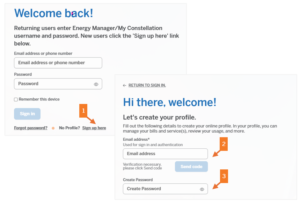
1. Visit account.constellation.com and click on No Profile? Sign Up here.

2. Enter your email address and click Send Code button to verify your email address.

3. Create your password and follow the prompts to set up your profile.


Link Your Profile & Service Account step 2 CEP enrollment
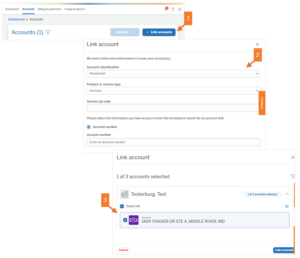
1. Click on the Accounts tab along the top, then click on the + Link Accounts button.

2. Select Residential and Services from the dropdown boxes, enter your Zip Code, and Home Services Account Number.

3. Select your account and click Link Accounts.


Enroll in AutoPay step 3 CEP enrollment
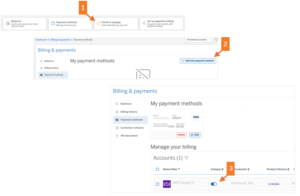
1. Click Enroll in Autopay from the Dashboard or go to Billing & Payments then Payment Methods.

2. Click +Add New Payment Method to add your credit card, debit card or bank account detail.

3. Slide the toggle to activate AutoPay and accept the AutoPay Terms.

Troubleshooting and Guide

A Customer Care Agent can assist you with enrollment. Call 844-552-0343

  • When creating a new profile, you receive the following error: Email is already linked to a profile.
  • You did not receive a verification code to your email after selecting “Forgot Password:
  • When linking account(s) to your profile, you receive an error message
  • You encounter “Locked” on your Payment Methods page:

Join our Email Club

X

This page is currently under construction.

Everyone needs to make home improvements from time to time and we are no exception. We are currently upgrading our online service scheduling experience, but you can still schedule service by contacting our Customer Care Center. Call 888.243.HOME to schedule service today.